> For the complete documentation index, see [llms.txt](https://docs.finngen.fi/llms.txt). Markdown versions of documentation pages are available by appending `.md` to page URLs; this page is available as [Markdown](https://docs.finngen.fi/working-in-the-sandbox/which-tools-are-available/atlas/detailed-guide/how-to-define-a-cohort-in-atlas/how-to-define-a-simple-icd-case-control-cohort-in-atlas/define-a-simple-icd-case-cohort-in-atlas.md).
# Define a simple ICD case cohort in Atlas
This example shows how to build a simple case cohort using the Finnish-specific H81 ICD10fi codes.
We will first use **Cohort Entry Events** to include everyone in the cohort and then use **Inclusion Criteria** to exclude people who are not in our Concept Set. In other words, we will use the **Inclusion Criteria** to only include patents with the Finnish-specific H81 ICD10fi codes into the case cohort.
Make sure to read the [Using standard and non-standard codes in Atlas Cohort Definitions](/working-in-the-sandbox/which-tools-are-available/atlas/detailed-guide/code-sets-in-atlas.md#using-standard-and-non-standard-codes-in-atlas-cohort-definitions) section from [Standard and non-standard codes](/working-in-the-sandbox/which-tools-are-available/atlas/detailed-guide/code-sets-in-atlas.md) to get more information on how to define cohorts with standard or non-standard codes. During this example. keep in mind that the H81 ICD10fi code is a non-standard code.
### Step 1: Create an empty Cohort
* Select the **Cohort Definitions** option on the left and click the **New Cohort** button on the right.
* **Name the Cohort** using a descriptive name followed by your initials (e.g. Test\_Cohort\_Cases\_MN).
* **Save the Cohort** by clicking the save button
### Step 2: Define Cohort Entry Events
* **Include everyone** and every event in the cohort by clicking the **Add Initial Event** button in the **Cohort Entry Events** section and by selecting the **Add Visit Occurrence** option from the list:
Select a visit occurrence of "Any Visit" to include all visits in the data.
### Step 3: Define Cohort Inclusion Criteria
We will now use **Inclusion Criteria** to only include patients with the H81 ICD10fi codes into the cohort.
* Click **New inclusion criteria** button in the **Inclusion Criteria** section and enter the criteria name (e.g. TestPhenotype) and an inclusion rule description:
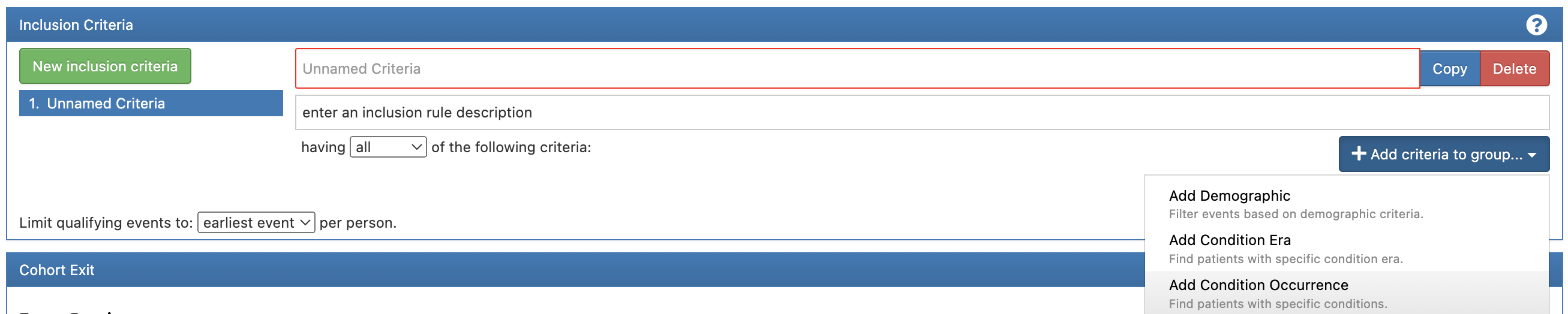
* Click **Add criteria to group** button and select **Add Condition Occurrence**:
* Note the **"at least 1**” selection for the cases cohort.
* Click **Add attribute** button and, because we are dealing with a non-standard code, select [**Add Condition Source Concept**](/working-in-the-sandbox/which-tools-are-available/atlas/detailed-guide/code-sets-in-atlas.md#using-standard-and-non-standard-codes-in-atlas-cohort-definitions):
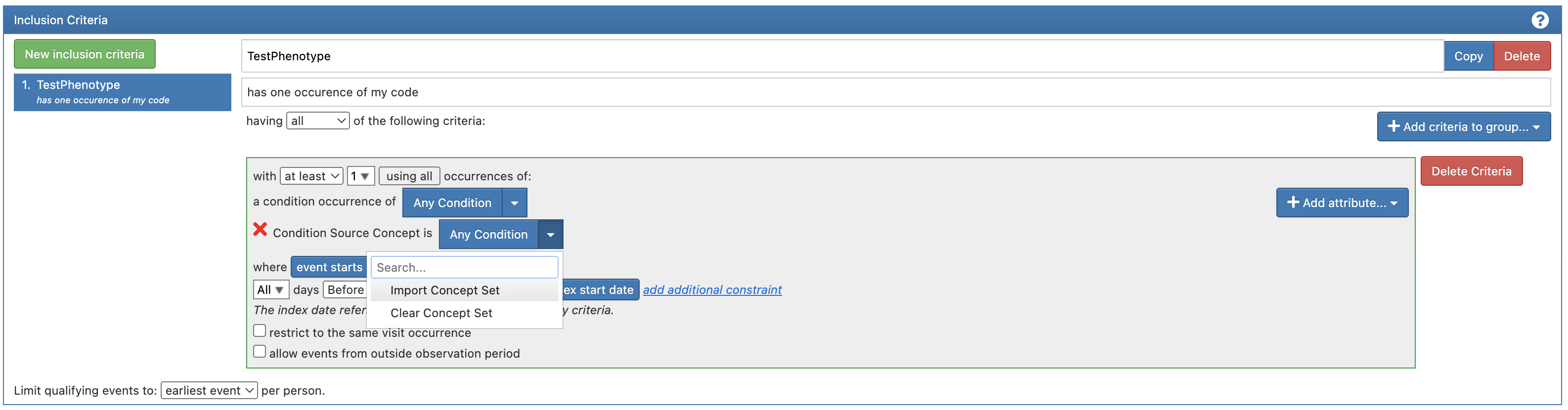
* Click the button on the right of the "Condition Souce Concept is" text and select the **Import Concept Set** option to import your Concept Set (e.g. MyPhenotypeCodeSet\[MN]):
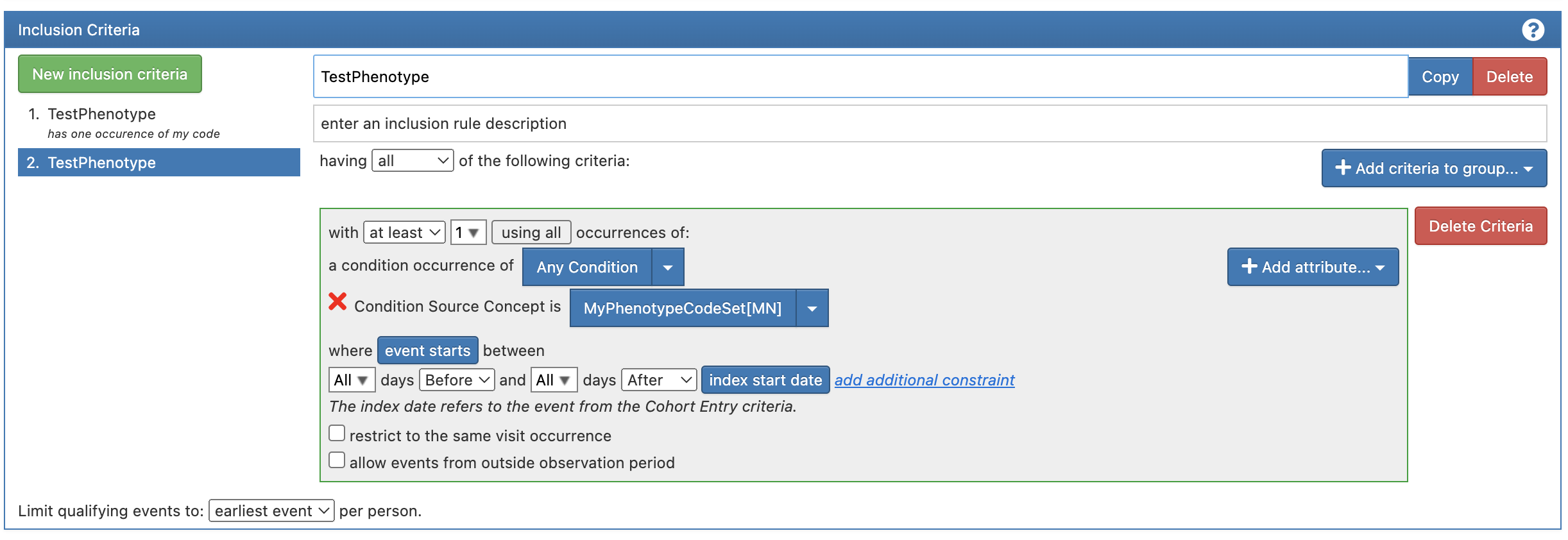
* The Concept Set name will be displayed on the right of the "Condition Souce Concept is" text:
* **Save the Cohort** by clicking the save button
### Step 4: Generate the case cohort
* Open the **Generation** tab and generate the cohort by clicking the **Generate** button next to the FinnGen data release (FinnGen CDM R11 in the screenshot below). The cohort generation will take a few minutes and the speed is not dependent on the size of the sandbox IVM.
The case cohort is now ready. This cohort can be [explored within Atlas](/working-in-the-sandbox/which-tools-are-available/atlas/detailed-guide/cohort-characterizations-in-atlas.md) and used in [Cohort Operations](/working-in-the-sandbox/which-tools-are-available/cohort-operations-tool-co.md) and [Trajectory Visualization tool](/working-in-the-sandbox/which-tools-are-available/trajectory-visualization-tool-tvt.md). The cohort may also be [exported from Atlas](/working-in-the-sandbox/which-tools-are-available/atlas/detailed-guide/how-to-define-a-cohort-in-atlas/how-do-you-export-finngen-ids-for-an-analysis-cohort.md) for further analyses like those described in the [General Workflows for the most common analyses](/working-in-the-sandbox/general-workflows-for-the-most-common-analyses.md).
### Next steps
* [Define a simple ICD control cohort in Atlas](/working-in-the-sandbox/which-tools-are-available/atlas/detailed-guide/how-to-define-a-cohort-in-atlas/how-to-define-a-simple-icd-case-control-cohort-in-atlas/define-a-simple-icd-control-cohort-in-atlas.md)


 ### Step 2: Define Cohort Entry Events
* **Include everyone** and every event in the cohort by clicking the **Add Initial Event** button in the **Cohort Entry Events** section and by selecting the **Add Visit Occurrence** option from the list:
### Step 2: Define Cohort Entry Events
* **Include everyone** and every event in the cohort by clicking the **Add Initial Event** button in the **Cohort Entry Events** section and by selecting the **Add Visit Occurrence** option from the list:
.png?alt=media)
.png?alt=media)
.png?alt=media)
.png?alt=media)
 button on the right of the "Condition Souce Concept is" text and select the **Import Concept Set** option to import your Concept Set (e.g. MyPhenotypeCodeSet\[MN]):
.png?alt=media)